
HTEGo!
Cloud Compliance for Mobile, Tablet and Desktop Compliance Placarding and Markings, Access to Regs, Cloud Storage PRODUCTS KEY FEATURES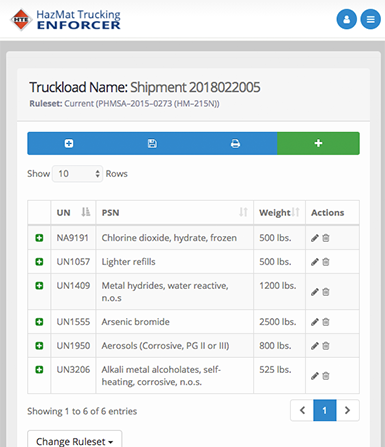
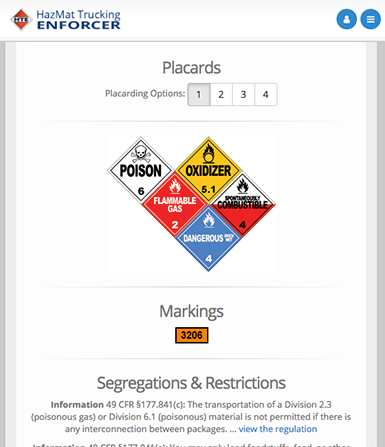
HTEGo! is compatible with Android, iPhone and Windows Phone. Desktop versions of HTE available for Microsoft Windows environments only.
About HTE
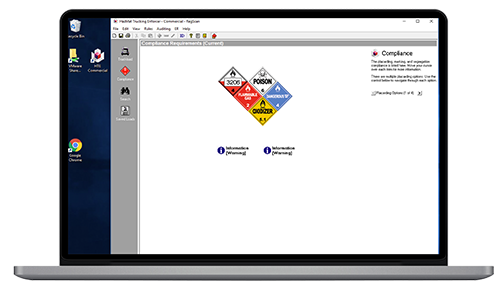
HazMat Trucking Enforcer contains a wide array of tools and interfaces that provide the hazmat highway transportation specialist the proper placarding, trailer markings, and segregation information to stay in compliance, avoid fines, and keep the roads safe.
Products
HazMat Trucking Enforcer is available in three different versions:
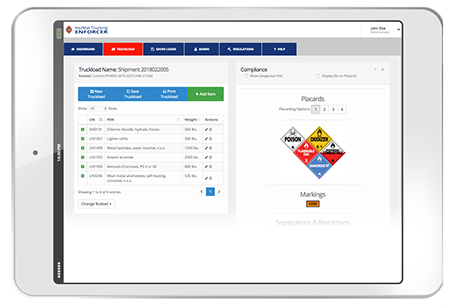

HTE Commercial
Why risk your ability to haul hazardous materials because your out of service rate is too high. As a safety professional, what can you do? The simple answer is to adopt the same enforcement tools that commercial vehicle inspectors use, HazMat Trucking Enforcer Commercial (HTEC)
HTEC provides instant access to both the current and voluntary regulations to help the dispatcher remove guesswork when running a placarding session. A RegScan sponsored study found that HTEC can help find up to 86% more violations, while spending 1/3 less time to perform each inspection
Using HazMat Trucking Enforcer Commercial saves time, since it is faster than looking up loads on charts and tables. Consistency improves because questions are not skipped, data entry is done the same by all employees, and steps are not missed in our streamlined work flow.
Each time new items are added to a load, the potential exists for new placarding or segregation errors. Eliminate these errors by providing Dispatchers access to HazMat Trucking Enforcer Commercial. Prior to adding items to a load recalculate the placarding and segregation options to uncover hidden conflicts.
All entry is based on the information required to be present on the shippers’ manifest, or, is directly observable from looking at the load. The design of HazMat Trucking Enforcer Commercial strives to minimize the amount of information that must be entered. When exceptions are allowed, questions are provided requesting information to confirm eligibility for that exemption. In situations where options, such as limited quantity, are not allowed, that option is grayed out.
Allows you to use as much or as little of HazMat Trucking Enforcer Commercial as you need. If all you need to do is confirm proper placarding, segregation, trailer markings, and shipping paper permits, then run placarding and shipping paper auditor. HTEC also allows you to audit/assess your truck more in detail with additional modules for motor cargo tank audits, labeling and packaging.
HTEC allows loads to be saved, so that when changes are needed minimal keying is required. To manage these saved loads, the saved load pane allows for a grid view. In the grid view, columns can be sorted in ascending or descending order to make finding loads faster. Once the load is found double-click on it to activate it. Deleting old loads is faster with a select, and click feature.
Saved loads can be exported and imported allowing you to e-mail loads to a central analysis point for review, checking, or archiving. The import and export functions are found on the file menu.
HTE Integrated
Transportation of hazardous materials regulated by the US Department of Transportation (US DOT) is as complex as ever. Industry can no longer treat hazmat fines as just a cost of doing business; fines have increased, media scrutiny of accidents and releases has become heightened, and terrorism concerns surround each shipment.
Hazmat Trucking Enforcer Integrated is designed to help commercial vehicle law enforcement officials inspect trucks carrying hazardous materials.
A RegScan sponsored study found that HTE can help find up to 86% more violations, while spending 1/3 less time to perform each inspection.
HTEI’s modules will tell the roadside inspector the proper segregation, truck markings, placarding and shipping paper formats for trucks hauling hazmat. This solution enables the inspector to save time and remove guesswork involved in Hazmat inspections. It also decreases inspector-training time and creates uniformity in the inspection procedures across your city or state all while keeping our roads and cities safe.


HTEGo!
HTEGo! brings the popular engine from RegScan's desktop hazmat placarding compliance product, HazMat Trucking Enforcer, to the cloud
SCHEDULE A DEMODid you know...
 0
HazMat Shipments Contain Errors
0
HazMat Shipments Contain ErrorsThe US DOT estimates that over 50% of all hazardous materials transportation or shipments contain errors.
 0
Less Than Satisfactory Compliance
0
Less Than Satisfactory ComplianceNearly two-thirds of all hazmat shipments rank less than satisfactory.
 0
Average Fine
0
Average FineClosed Enforcement Cases against Shippers has averaged over $16,000.
Key Features
Some of the core HazMat Trucking Enforcer features with the HTE Engine that drives the compliance results.
2400+ IDs
Over 2400 unique IDs, complete with their proper shipping name, hazard class, packing group, hazard zone, inhalation hazard status, and more.
Quarterly Updates
The HTE engine is updated quarterly to ensure compliance in a changing regulatory climate.
User Friendly
Mobile, Tablet and Desktop interfaces optimized for efficient data entry, retrieval and research.
Regulation Access
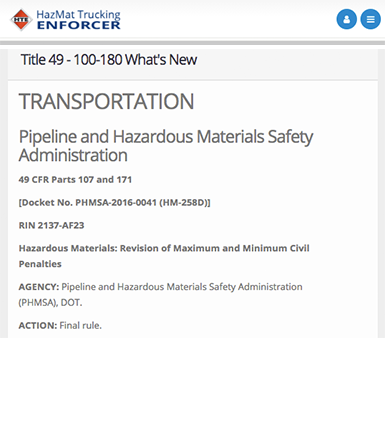
Access to the U.S. Code Title 49 Part 100-180 (HazMat) and 200-399 (FMCSA), including full-text search and Hazardous Materials Tables.
Collaborate Work
Saved loads can be exported and imported between Desktop and Cloud applications, improving workflow and accessibility.
Class 7 Radiation
HTE provides class 7 shipping ids, proper shipping names and placarding options.

Exceptions & Exemptions
Commodity specific questions provide exception and exemption compliance results.
Mandatory and Voluntary Rulesets
Choose from the default Mandatory ruleset to any available Voluntary rulesets available.
Placard Features
Additional options allow you to place
Orange Panel or ID onto placards.

Dangerous Placard
HTE Supports the use of the
Dangerous placard.

Placarding Options
HTE provides multiple placarding options when available that may better align with company policies on placard usage.
FAQ'S
Below are a few frequently asked questions about HazMat Trucking Enforcer products.
HazMat Trucking Enforcer desktop products run on Microsoft Windows® operating systems, both in stand-alone and networked environments.
HTEGo! is supported by modern web browsers including Microsoft Internet Explorer 11, Microsoft Edge, Google Chrome, Mozilla Firefox and Firefox Quantum, and Apple's Safari.
Official support for HazMat Trucking Enforcer products consists of the operating systems, environments and web browsers mentioned. While other installation environments and browsers may be possible, RegScan™ only provides technical support for these officially supported scenarios.
Currently we do not have a way for you to purchase a license online. While you may be able to download the desktop version of the software, you will need to purchase a license directly from a member of the RegScan™ sales team. Please click here to schedule a call with someone from our sales team.
RegScan™ releases four quarterly updates to the HazMat Trucking Enforcer products. This includes improvements and regulatory modifications to the HTE Engine as well as any regulatory text updates. The HTE Engine output is based on the regulatory requirements at release time.
More questions or ready to speak with someone?
Click the below button to contact someone on the RegScan™ sales team.
CONTACT USDownloads
Downloads are available for install on Microsoft® Windows Operating Systems.
Current Release Info:
- Date
- 12/21/2023
- Version
- 7.47
Looking for HTEGo ?
Please Contact Us for a demo or to get started with HTEGo!
Registration
To complete the registration process you will need "Your Registration Key" displayed in the registration wizard of the desktop editions of HTE.
We recommend you copy and paste your Registration Key in the below box, then press "Submit". Another screen will appear containing your authorization code. Copy this code and paste it back into the HTE desktop edition to complete the registration process.